
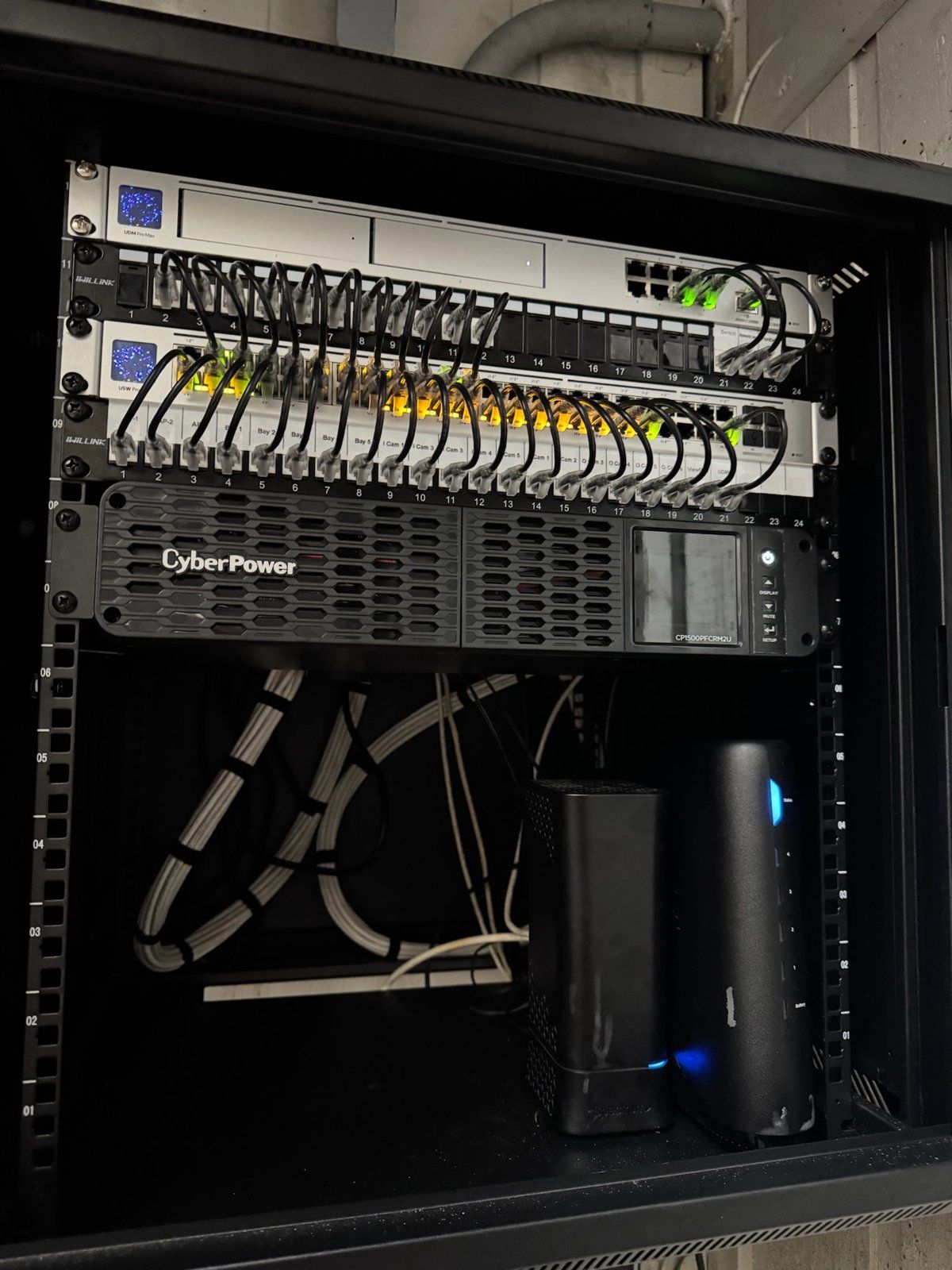
A lot of homes in Palm Bay and Viera have a fast internet connection landing in the worst possible spot. The fiber ONT is screwed to the garage wall next to the water heater, or the cable modem is in a bedroom closet because that is where the builder put the one coax jack. The service is gigabit or better. The Wi-Fi in the kitchen is still terrible. That is the gap this post is about, and it is almost word for word what people in Palm Bay have been searching for this fall: residential low voltage ethernet wiring.
Here is how we fix it, what a 10G-capable backbone means in plain terms, and how the job changes between a finished home in Port Malabar and a new build off Borrego Drive that has not been drywalled yet.
Why the ONT or modem ends up in the garage
Nobody chooses the garage. The fiber or coax enters the house at the demarcation point, which is wherever the utility ran its line, and the installer's job ends a few feet past that. In Bayside Lakes and most of Port Malabar the drop lands in the garage or on an exterior wall by the electrical panel. In older Suntree homes it is usually a bedroom closet with a coax jack from the satellite TV era. Either way, the router goes right next to it because that is the only place with a connection, and the whole house runs on whatever Wi-Fi can push through concrete block and a couple of interior walls.
Speed tests near the router look great. The lanai TV buffers. The office over the garage drops Teams calls. Someone buys a mesh kit, which helps a little and adds another box to troubleshoot.
Two ways to move the connection to the middle of the house
There are two fixes, and which one we recommend depends on what the house already has.
Relocate the ONT or modem
For fiber, the ONT itself can move if we run a fiber jumper or a new drop from the demarcation point to a central closet. Some providers prefer to do that leg themselves, and we coordinate so your end is ready the same day. For cable, a single good coax run to the new location does the same job for the modem. We did exactly this on a Palm Bay fiber relocation in October: ONT moved from the garage to a hall closet, with a small wall-mount rack behind it holding the router, a switch and the PoE gear.
Leave the ONT where it is and run Cat6 to a rack
Often the cleaner answer is to leave the provider's box alone and run one Cat6 or Cat6A cable from the ONT to a central rack. The router lives at the rack, not at the demarc. Every other run in the house then starts from that rack: the office, the TV wall, the ceiling access points and the cameras. One cable from the garage is far easier to fish than rerouting fiber.
Either way, the goal is the same. One spot in the house, usually a hall closet, laundry room or a pantry corner, where every wire ends and every piece of network gear sits on a shelf or in a small rack with a labeled patch panel.
What a 10G-capable backbone actually means for a homeowner
Here is what it buys you.
- A multi-gig router. Fiber plans in Brevard now go past 1 gigabit, and a router with a 2.5G or 10G WAN port is the only way to use all of it.
- A switch with 10G ports. Not every port needs to be 10G. The rack needs a few: one for the router, one for the office, one for the main TV wall or media closet, and one for a NAS if you have one.
- Cat6A on the runs that matter. Cat6A carries 10G at full length. Cat6 handles 10G over shorter runs and 2.5G everywhere. We typically pull Cat6A from the rack to the office and the TV wall, and Cat6 to the rest.
- PoE where it belongs. Ceiling Wi-Fi access points and outdoor cameras are powered over the same Cat6 that carries their data. Those drops belong on the same plan, terminated at the same rack, fed by a PoE switch. Adding them later means opening ceilings twice.
You do not need 10G to every bedroom. You need 10G where the heavy traffic is and a wired drop everywhere a TV, desk or access point will live. Wired devices stop competing for Wi-Fi, and the Wi-Fi gets noticeably better for the phones and tablets left on it. Our post on building a wired home office with PoE covers the single-room version of this. This is the whole-house version.
Ready to move your network out of the garage? The Electpros serve all of Brevard County, from Melbourne and Palm Bay to Viera and Titusville, with same-day and next-day availability. Call (321) 655-PROS or book online at theelectpros.com.
How do I get wired internet in every room of my house?
One cable per location, run back to a central point, with a plan drawn before anyone drills a hole. The difference is in how the cables get there.
Finished home
In a block home in Port Malabar or a remodel in Suntree, we fish cable through the attic and down interior walls, using existing chases, closets and the space behind baseboards where we can. Single-story homes with attic access are the easiest case and most of Palm Bay is exactly that. Two-story homes and concrete interior walls take longer, and in a few spots a surface raceway is the better call than a hole in a tile wall. We walk the house first and tell you which drops are not worth the drywall repair.
New build before drywall
On a new construction site, the cost per drop falls sharply because the walls are open. We were recently walked through a new build off Borrego Drive in Viera where the builder had already pulled Cat6 to a dozen locations. The missing pieces were the rack, the patch panel, the switch and the camera and access point drops that the builder's electrician had not planned for. Getting those on the plan before insulation goes in is the cheapest networking you will ever buy. If you are building in Viera, Addison Village or anywhere else in the county, call us before the drywall crew does.
Both versions end at the same place: a labeled rack, a wired drop at each TV and desk, access points in the ceiling instead of a router on a shelf, and a home network that behaves the way a gigabit plan should.
What a typical Brevard job looks like
For a three- or four-bedroom home, a full structured wiring job usually comes out to eight to fourteen drops, a wall-mount rack, a multi-gig router, a PoE switch, two or three ceiling access points and a handful of camera locations roughed in for later. The provider connection moves, or a single run brings it to the rack. We label and test every cable. We install networks; we do not repair computers or TVs, so if the problem turns out to be a failing laptop we will tell you that rather than sell you a switch.
If you just landed for the season and the first thing you noticed was the Wi-Fi, this is the project that fixes it for good. See our residential IT services for the full list of what we handle in a home, or reach out for a walkthrough in Palm Bay, Viera, Melbourne or anywhere else in Brevard County. Call (321) 655-PROS or book online at theelectpros.com.